Never miss
another meeting.
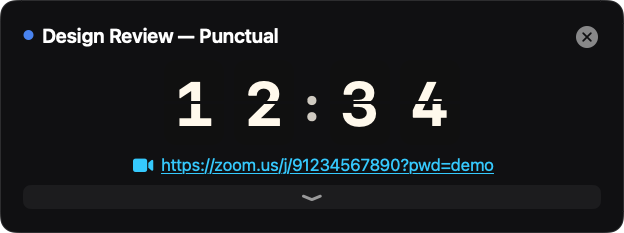
Punctual puts an unmissable countdown to your next meeting right under the macOS menu bar — and refuses to go away until you deal with it.
An alert you can't ignore
Ten minutes before start — or earlier, if you need to travel — a countdown box appears under the menu bar. It stays until you join or deliberately clear it. Notifications can be missed. This can't.
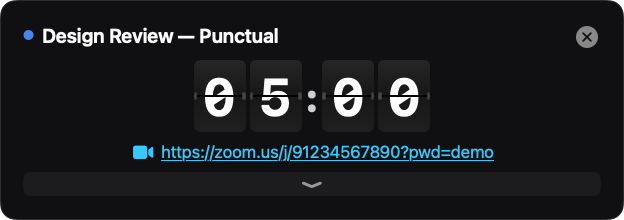
The Solari board
An airport-style split-flap clock, flipping every second. One click joins the call.
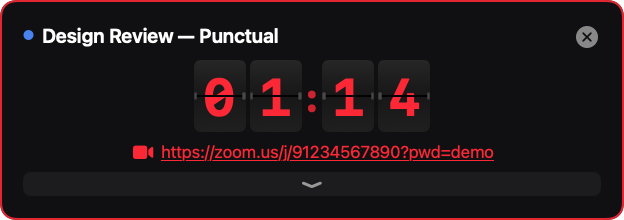
Running late? You'll know.
Past the start time everything turns red and counts up. No ambiguity.
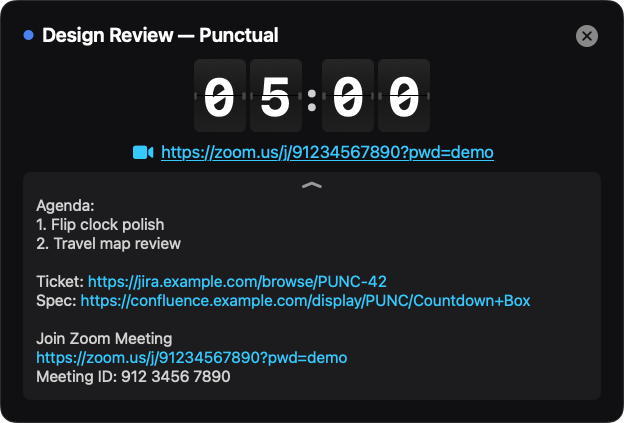
The agenda, one flip away
Pull down the drawer for full meeting notes with live links — Jira, Confluence, docs — with the invite boilerplate stripped out.
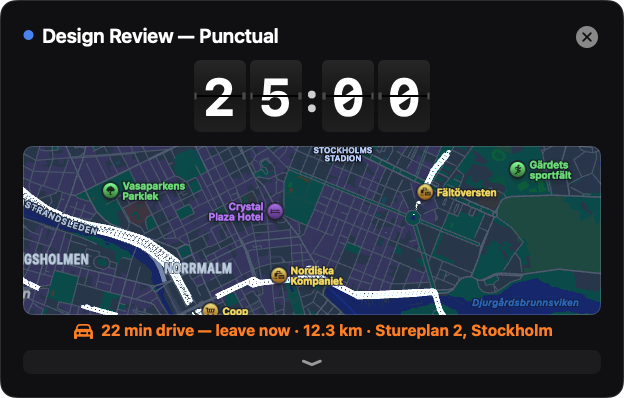
Leave on time, arrive on time
In-person meeting? Punctual checks the drive, shows the map, and alerts you when it's time to leave — not just when the meeting starts.
Your clock, your style
Split-Flap, retro Flip Clock, or Minimal digits — in three sizes.
Small app. Sharp edges.
60+ meeting services
Zoom, Meet, Teams, Webex, FaceTime, Chime, Slack huddles and dozens more — found in the invite even when Outlook wraps the links.
Leave-by alerts
Live driving time from Apple Maps, re-checked every five minutes. The alert fires when you must leave, not when it's already too late.
Join from anywhere
⌃⌥J joins your next meeting from any app. Zoom and Teams links can open directly in their native apps.
Your calendars, your colours
Works with every calendar your Mac knows — iCloud, Google, Microsoft 365 — with per-calendar selection and calendar colours throughout.
Tomorrow at a glance
In the evening the menu already shows tomorrow's schedule under a date header, quietly dimmed until midnight.
Private by design
No accounts, no analytics, no servers. Your calendar never leaves your Mac.